
How DNS Resolution Works ?
A developer who likes to builds on his ideas ..
DNS Resolution Explained Using dig (Beginner-Friendly)
What is DNS and why name resolution exists
Humans remember names.
Computers communicate using numbers (IP addresses).
When you type:
google.com
Computers reads:
142.250.xxx.xxx
DNS (Domain Name System) exists to translate names → IP addresses.
Think of DNS as the internet’s phonebook:
You look up a name
DNS gives you the number
Without DNS, you would need to memorize IP addresses for every website.
Why DNS is not one big database
People confuse DNS only being a database but its not that.
DNS is:
Distributed
Hierarchical
Globally scalable
No single server knows everything.
Instead, DNS resolution happens in layers:
Root → TLD → Authoritative
Understanding this hierarchy is the key to understanding DNS.
DNS Resolution
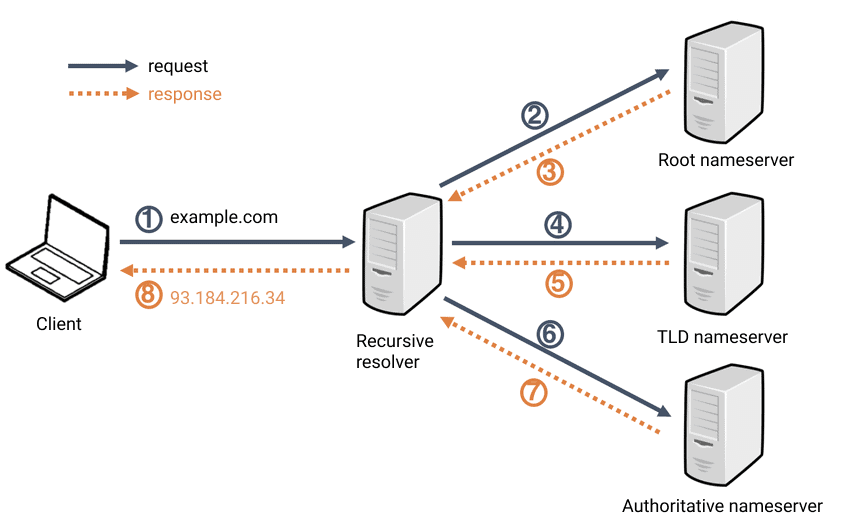
The resolution process typically involves four types of servers working in a chain:
Recursive Resolver (Recursor): The "librarian" that receives the initial query from your device and manages the hunt for the IP address by querying other servers.
Root Nameserver: The first stop in the hierarchy; it directs the resolver to the specific Top-Level Domain (TLD) server (e.g.,
.comor.org).TLD Nameserver: Hosts the registry for a specific domain extension and points the resolver to the domain's authoritative nameserver.
Authoritative Nameserver: The final stop that holds the actual DNS records (like the IP address) and provides the definitive answer to the resolver. What is the
digcommand?
dig (Domain Information Groper) is a DNS diagnostic tool.
It lets you:
Ask DNS servers questions directly
See how name resolution works
Debug DNS issues
Browsers hide DNS details.dig reveals them.
DNS hierarchy (mental model first)
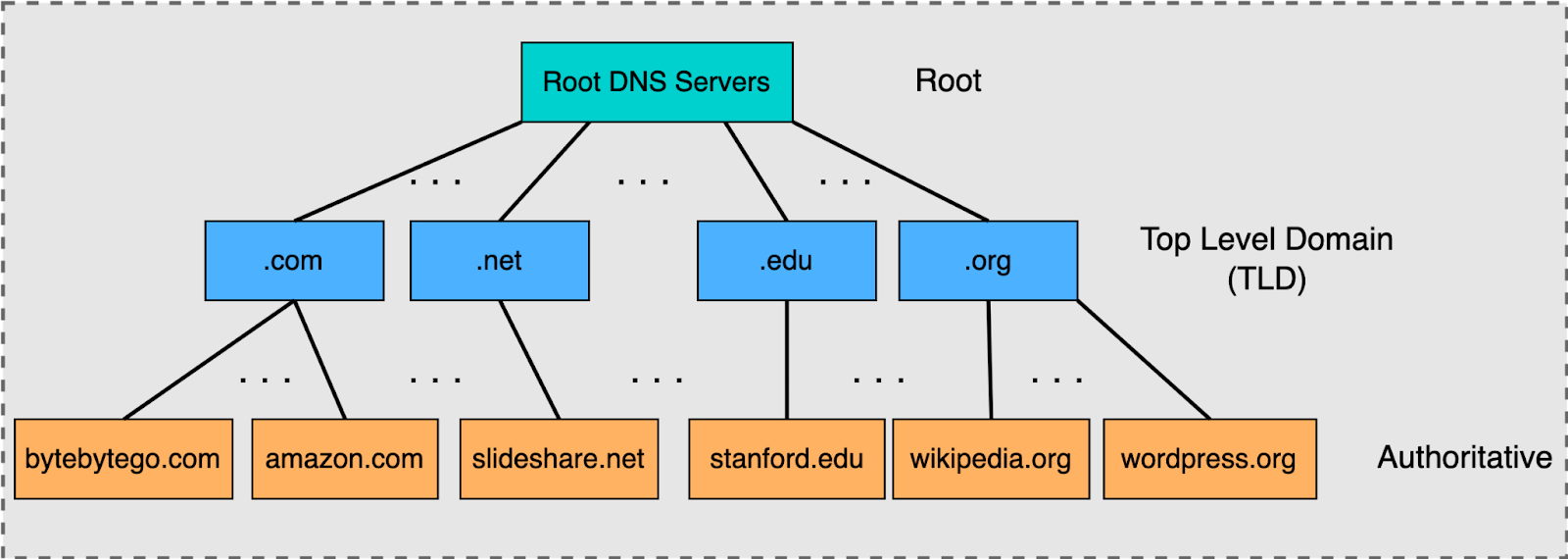
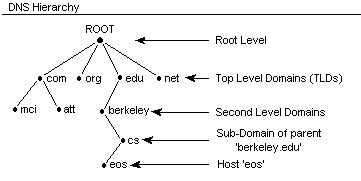
DNS works like this:
Root name servers know where TLD servers are
TLD name servers know where authoritative servers are
Authoritative name servers know the final answer
Let’s walk through this step by step using dig.
dig . NS — Root name servers
Command:
dig . NS
What this asks:
“Who are the name servers for the DNS root?”
What you learn:
These servers sit at the top of DNS
They don’t know IPs for websites
They only know where TLD servers are
Key insight:
Root servers don’t resolve domains.
They point you in the right direction.
dig com NS — TLD name servers
Command:
dig com NS
What this asks:
“Who manages
.comdomains?”
What you learn:
.comis a Top-Level Domain (TLD)These servers know which authoritative servers handle each
.comdomain
Key insight:
TLD servers don’t know Google’s IP either.
They know who is responsible for google.com.
dig google.com NS — Authoritative name servers
Command:
dig google.com NS
What this asks:
“Who is authoritative for google.com?”
What you learn:
These servers are owned by Google
They hold the actual DNS records
This is where truth lives
Key insight:
Authoritative servers give final DNS answers.
Recursive resolver asks root servers
Root points to .com TLD servers
TLD points to Google’s authoritative servers
Authoritative server returns IP address
Resolver caches the result
Browser connects to the IP
You see only the final answer, but all layers were involved.
What NS records actually represent
An NS record answers one question:
“Who is responsible for this domain?”
Root NS → responsible for TLDs
TLD NS → responsible for domains
Domain NS → responsible for DNS records
NS records do not point to IPs.
They point to authority.
Where recursive resolvers fit in
Your browser does not run all these dig steps.
Instead:
Your system asks a recursive resolver (ISP, Google, Cloudflare)
The resolver performs all the steps
Results are cached for speed
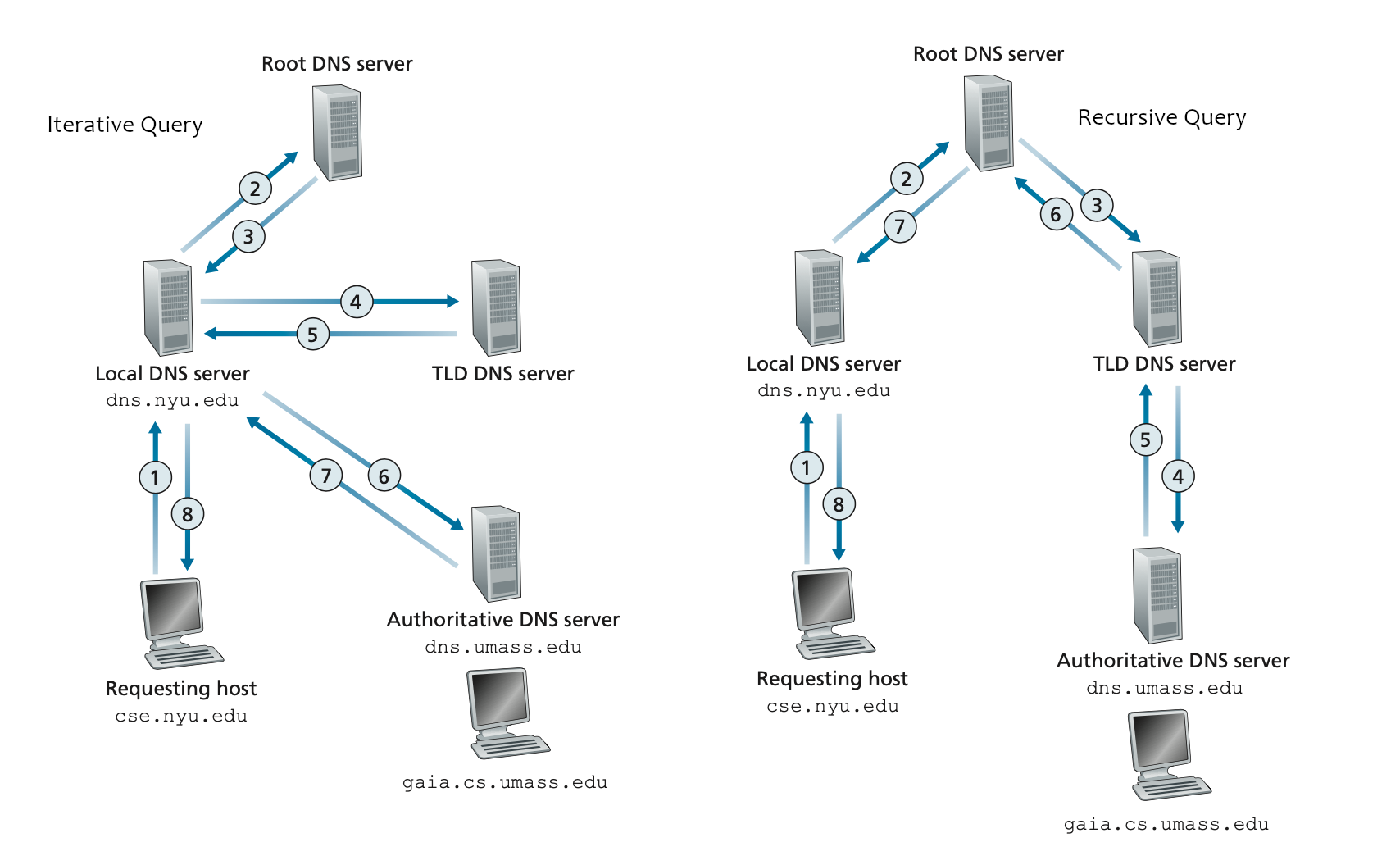
That’s why DNS is:
Fast
Scalable
Efficient
Connecting this to real browser requests
When you type:
https://google.com
Your browser:
Uses a recursive resolver
Gets the IP via DNS hierarchy
Opens a TCP connection
Sends an HTTP request
DNS resolution always happens before HTTP.
Why dig matters for developers
dig command-line tool is like opening the hood of a car to see how the engine is actually running, rather than just looking at the dashboard. For developers, it is an essential tool for verifying that the "phonebook of the internet" is working correctly.
Here is why dig matters for your daily development work:
Verifies Real Records: Unlike a browser, which might show you an old version of a site due to its internal cache,
digqueries DNS servers directly. This ensures the IP address you see is exactly what the DNS server is currently sending out.Troubleshoots "Site Down" Issues: If a website isn't loading,
dighelps you pinpoint if the problem is a broken DNS record (like a missing A record), a server outage, or a configuration error at your domain registrar.Tracks DNS Propagation: After you update your DNS settings, it can take time for those changes to spread across the world. You can use
dig @8.8.8.8to check what Google's servers see versus what your local provider sees, helping you confirm if your changes are "live" yet.
