
Getting Started with cURL
A developer who likes to builds on his ideas ..
cURL stands for "Client for URLs" , a command-line tool used to transfer data to or from a server.
First, what is a server?
A server is just a computer(a machine which is 24×7 available) on the internet that:
waits for requests
sends back responses
When you open a website, your browser talks to a server.
You don’t see the conversation.
But it’s happening every time
Servers:
store websites
provide data (APIs)
accept form submissions
handle logins, payments, uploads
If you are a programmer, you must be able to talk to servers directly, not only through a browser.
That’s where cURL comes in.
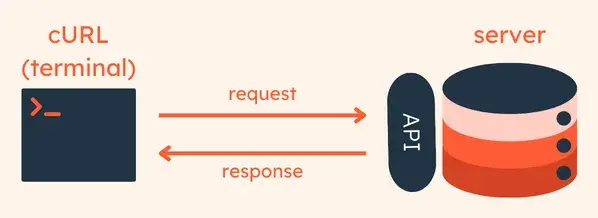
What is cURL?
cURL is a tool that lets you send messages to a server from the terminal.
That’s it.
No UI.
No browser.
Just you → terminal → server.
Think of cURL as: “A browser controlled by commands nothing else”.
Why programmers need cURL ?
Because browsers:
hide details
auto-handle things
don’t show raw responses clearly
cURL lets you:
Test servers quickly
Talk to APIs
Debug backend issues
Understand what’s really happening
Direct Protocol Interaction
If you work with backend, APIs, or DevOps — cURL is must.
Making your first request using cURL
- cURL usually comes pre-installed on macOS, Linux, and Windows 10/11.
Open your Terminal (Mac/Linux) or Command Prompt (Windows) and type:
bash
curl --version
The simplest way to use cURL is to fetch a website's content. Type this and hit Enter:
curl https://www.google.comWhat happened? You just received a giant wall of text. That is the HTML code that makes up Google's homepage. Your browser usually turns this code into a pretty page, but cURL shows you the raw data.
By running this command, we confirm three things:
our computer can reach the server
The server responded successfully
We received real data from the internet
cURL does not:
Open a webpage visually
Run JavaScript
Load images or styles
It only fetches and displays the response.
How Does a Request/Response model works?

How Request–Response works (simple view)
Client sends a request to the server
Server understands what is being asked
Server performs the action
Server sends a response back
Client uses the responseHTTP Methods (What kind of action you are asking for————————————————————————————————————-
When you use cURL or a browser, you are not just contacting a server —
you are also telling it what you want to do.
That instruction is called an HTTP method.
Common HTTP methods (only the important ones)
GET
Used to request data
Example: loading a webpage or fetching API dataPOST
Used to send data to the server
Example: submitting a form, creating a new userPUT
Used to update existing data
Example: updating a user profileDELETE
Used to remove data
Example: deleting a record
For beginners, remember this:
GET = ask
POST = send
PUT = update
DELETE = remove
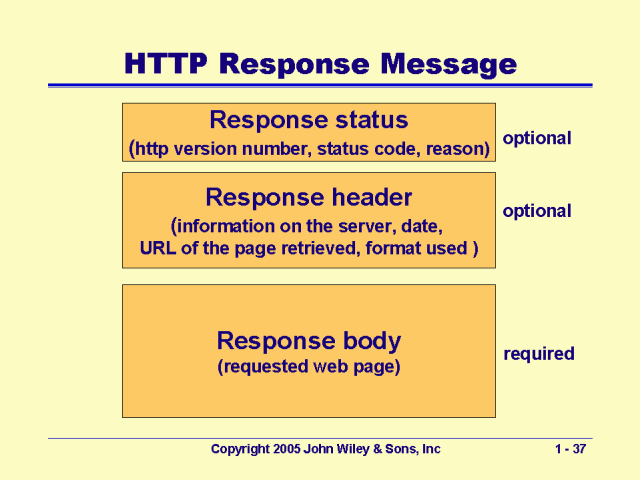
Status Codes: Indicate the outcome of the request (e.g., 200 OK, 404 Not Found). Status codes are short numbers that explain the result.
Response Headers: Additional information that accompanies the response.
Response Body: Data returned by the server (e.g., HTML, JSON).
